
Ender 3 Klipper Conversion – Stage 4 – PID calibration
Ender 3 Klipper Conversion – Stage 1 – Klipper & Mainsail
Ender 3 Klipper Conversion – Stage 2 – Configure Bed Level Probe
Ender 3 Klipper Conversion – Stage 3 – Extruder Rate & Stepper Motor Calibration
Ender 3 Klipper Conversion – Stage 4 – PID calibration
Ender 3 Klipper Conversion – Stage 5 – Camera Setup & Remote Access
Ender 3 Klipper Conversion – Stage 6 – Macros
Ender 3 Klipper Conversion – Stage 7 – Filament Runout Sensor
Ender 3 Klipper Conversion – Troubleshooting
Calibrate PID settings
Klipper supports PID control for the extruder and bed heaters. In order to use this control mechanism, it is necessary to calibrate the PID settings on each printer (PID settings found in other firmwares or in the example configuration files often work poorly).
To calibrate the extruder, navigate to the command console and run the PID_CALIBRATE command. For example: PID_CALIBRATE HEATER=extruder TARGET=170
PID_CALIBRATE HEATER=extruder TARGET=170At the completion of the tuning test run SAVE_CONFIG to update the printer.cfg file the new PID settings.
If the printer has a heated bed and it supports being driven by PWM (Pulse Width Modulation) then it is recommended to use PID control for the bed. (When the bed heater is controlled using the PID algorithm it may turn on and off ten times a second, which may not be suitable for heaters using a mechanical switch.)
Ender 3 printers use PWM so we can calibrate the bed:
PID_CALIBRATE HEATER=heater_bed TARGET=60Troublshooting
Heater extruder not heating at expected rate.Possible issues
- Loose heater wires.
- Missing silicone socks.
- High controller fan speed.
- Faulty broken thermistor / heater or cable.
Loose heater wires
Check all the wires going into the main board. Unplug / unscrew then plug / screw them in again.
Missing silicone socks
Install a silicone sock.
High Controller Fan Speed
Calibrate the heater using typical print settings.
- Set Controller Fan to maximum or to the setting it is typically used when printing.
- Do a PID calibration
PID_CALIBRATE HEATER=extruder TARGET=170Reduce part cooling fan speed
Try reducing fan speed to 70% – 90%
Faulty broken thermistor / heater or cable
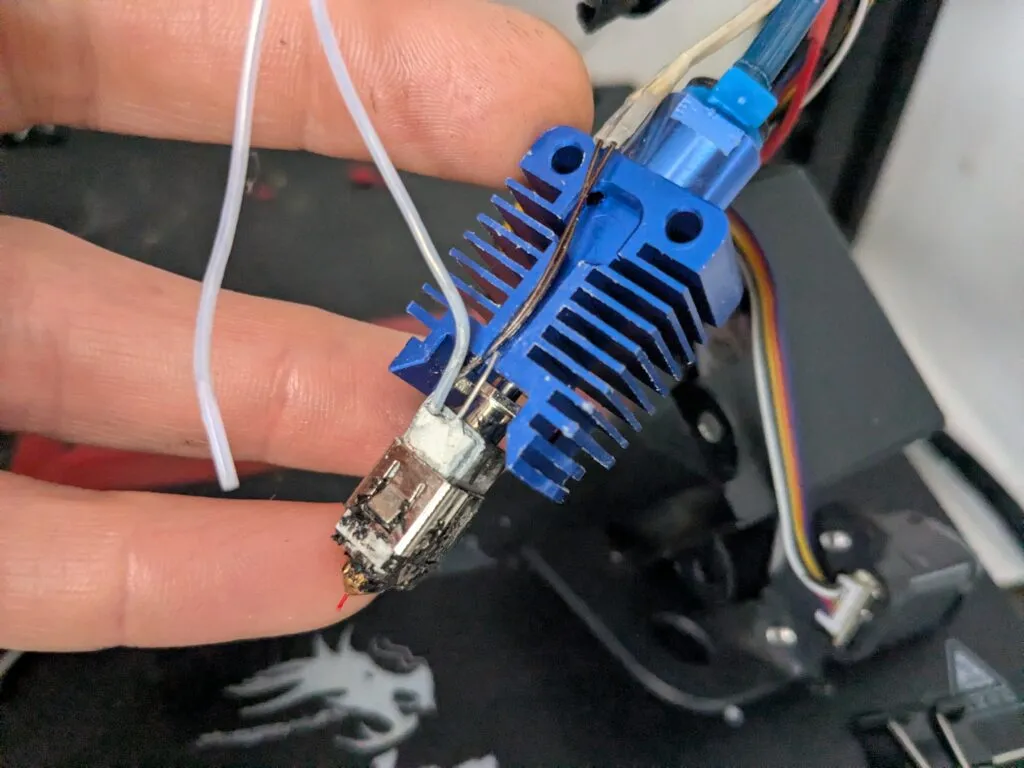
Heater cartridges with solid single wire are prone to breaking. Make sure the cable doesn’t move during printing.
Cable drag chain: