
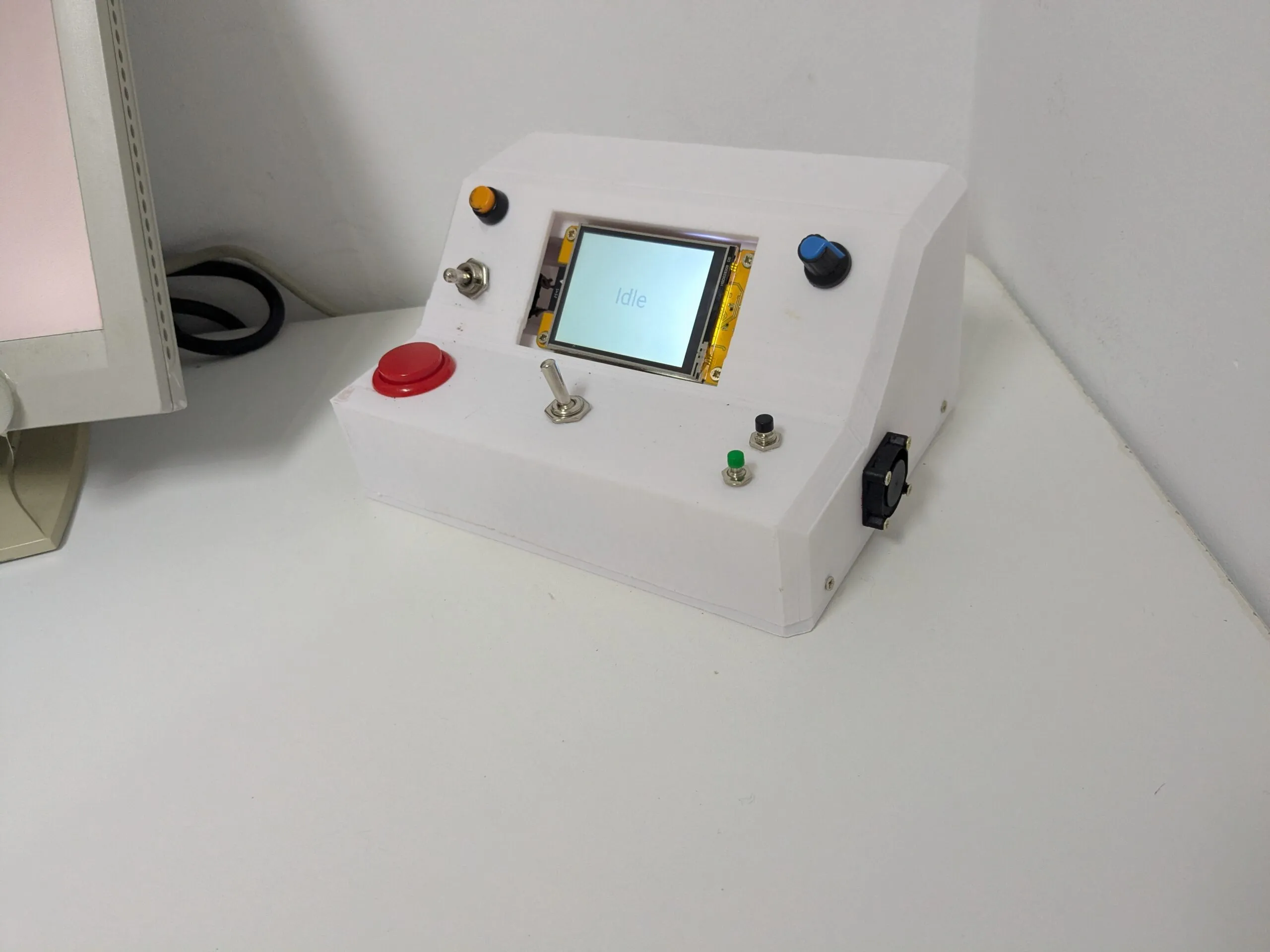
CYD ESPHome Homeassistant Timer module & Pinpad
Code and stuffs to create a homeassistant timer for the widely available Cheap Yellow Display (CYD) board.
When a timers starts in homeassistant the same timer is displayed on the screen with a timer bar at the bottom. It displays only minutes and seconds as this is used for a 60 minutes timer.
When a screen is touched, the pinpad activates and waits for input. If no input is given it changes back to the timer.
esphome:
  name: pinpadwithtimer
  friendly_name: PinPadWithTimer

esp32:
  board: esp32dev
  framework:
    type: arduino

logger:
api:
  encryption:
    key: super_secret_api_key
ota:
  - platform: esphome
    password: !secret pinpadwithtimer__ota_password

wifi:
  ssid: !secret wifi_ssid
  password: !secret wifi_password
  ap:
    ssid: !secret pinpadwithtimer__ap_ssid
    password: !secret pinpadwithtimer__ap_password
captive_portal:
Paste after captive_portal:
# ================= BUS CONFIGURATION =================
#  Split the same physical pins into two distinct SPI IDs to stop mipi_spi bus locks
spi:
  # Main Display Hardware SPI Bus
  - id: tft_spi
    clk_pin: GPIO14
    mosi_pin: GPIO13
    miso_pin: GPIO12

  # Separated Touchscreen Hardware SPI Bus
  - id: touch_spi
    clk_pin: GPIO25
    mosi_pin: GPIO32
    miso_pin: GPIO39


globals:
  - id: target_timestamp
    type: double
    initial_value: '0.0'
  - id: current_page
    type: std::string
    initial_value: '"TIMER"'
  - id: entered_code
    type: std::string
    initial_value: '""'
  - id: pad_status
    type: std::string
    initial_value: '"Enter PIN"'
  - id: active_pressed_btn
    type: int
    initial_value: '0'

text_sensor:
  - platform: homeassistant
    id: s_timer_main_state
    entity_id: timer.s_timer
    on_value:
      then:
        - component.update: my_display
  - platform: homeassistant
    id: s_timer_state
    entity_id: timer.s_timer
    attribute: remaining
    on_value:
      then:
        - component.update: my_display
  - platform: homeassistant
    id: s_timer_duration
    entity_id: timer.s_timer
    attribute: duration
    on_value:
      then:
        - component.update: my_display

sensor:
  - platform: homeassistant
    id: s_timer_finishes_epoch
    entity_id: timer.s_timer
    attribute: finishes_at
    device_class: timestamp
    on_value:
      then:
        - lambda: |-
            id(target_timestamp) = x;
        - component.update: my_display

binary_sensor:
  - platform: template
    name: "PinPad Security Access"
    id: s_pin_success
    device_class: lock

font:
  - file: gfonts://Roboto
    id: timer_font
    size: 48
  - file: gfonts://Roboto
    id: pad_font
    size: 64      # Increased from 28 to make the PIN stars much bigger
  - file: gfonts://Roboto
    id: status_font
    size: 22


output:
  - platform: ledc
    id: backlight_pwm
    pin: GPIO21

light:
  - platform: monochromatic
    name: Display Backlight
    id: tft_backlight
    output: backlight_pwm
    restore_mode: ALWAYS_ON

script:
  # 1. Verifies the security code entered by the user. Change the password here if needed:
  - id: verify_pin
    then:
      - lambda: |-
          if (id(entered_code) == "1234") {
            id(pad_status) = "Success!";
            id(s_pin_success).publish_state(true); // <--- RESTORED: Sends the ON signal to Home Assistant
          } else {
            id(pad_status) = "Invalid PIN!";
          }
      - component.update: my_display
      - delay: 2s
      - lambda: |-
          id(s_pin_success).publish_state(false); // <--- RESTORED: Automatically resets the HA switch back to OFF
          id(entered_code) = "";
          id(current_page) = "TIMER";
      - component.update: my_display

  # 2. Inactivity watchdog timer for the PIN Pad
  - id: pinpad_timeout_watchdog
    mode: restart
    then:
      - delay: 30s
      - lambda: |-
          if (id(current_page) == "PINPAD") {
            id(entered_code) = "";
            id(pad_status) = "Enter PIN";
            id(current_page) = "TIMER";
            id(my_display).update();
          }


display:
  - platform: mipi_spi
    id: my_display
    spi_id: tft_spi
    model: ILI9342
    cs_pin: GPIO15
    dc_pin: GPIO2
    dimensions:
      width: 320
      height: 240
    rotation: 180
    invert_colors: true
    update_interval: 1s
    data_rate: 8000000
    lambda: |-
      // ================= PAGE 1: TIMER INTERFACE =================
      if (id(current_page) == "TIMER") {
        Color bg_color = Color(20, 20, 20);
        Color text_active = Color(0, 255, 100);
        Color text_paused = Color(255, 140, 0);
        Color text_idle = Color(120, 120, 120);
        Color bar_fill_color = Color(0, 150, 255);
        Color bar_bg_color = Color(60, 60, 60);

        it.fill(bg_color);

        std::string state = id(s_timer_main_state).state;
        std::string remaining = id(s_timer_state).state;
        std::string duration_str = id(s_timer_duration).state;

        long total_seconds = 0;
        long remaining_seconds = 0;
        int dur_h = 0, dur_m = 0, dur_s = 0;

        if (sscanf(duration_str.c_str(), "%d:%d:%d", &dur_h, &dur_m, &dur_s) >= 2) {
            total_seconds = (dur_h * 3600) + (dur_m * 60) + dur_s;
        }

        if (state == "active") {
            double target_epoch = id(target_timestamp);
            double now_epoch = (double)::time(nullptr);

            if (target_epoch > 0) {
                remaining_seconds = (long)(target_epoch - now_epoch);
                if (remaining_seconds < 0) remaining_seconds = 0;

                int total_m = remaining_seconds / 60;
                int s = remaining_seconds % 60;
                it.printf(160, 90, id(timer_font), text_active, TextAlign::CENTER, "%02d:%02d", total_m, s);
            } else {
                it.print(160, 90, id(timer_font), text_active, TextAlign::CENTER, remaining.c_str());
            }
        } else if (state == "paused") {
            int rem_h = 0, rem_m = 0, rem_s = 0;
            if (sscanf(remaining.c_str(), "%d:%d:%d", &rem_h, &rem_m, &rem_s) >= 2) {
                remaining_seconds = (rem_h * 3600) + (rem_m * 60) + rem_s;
            }
            int total_paused_m = (rem_h * 60) + rem_m;
            it.printf(160, 90, id(timer_font), text_paused, TextAlign::CENTER, "%02d:%02d", total_paused_m, rem_s);
        } else {
            it.print(160, 110, id(timer_font), text_idle, TextAlign::CENTER, "Idle");
        }

        if ((state == "active" || state == "paused") && total_seconds > 0 && remaining_seconds <= total_seconds) {
            int bar_x = 0;
            int bar_y = 204;
            int bar_width = 320;
            int bar_height = 36;
            float progress = (float)remaining_seconds / (float)total_seconds;
            if (progress > 1.0f) progress = 1.0f;
            if (progress < 0.0f) progress = 0.0f;
            int fill_width = (int)(bar_width * progress);

            it.rectangle(bar_x, bar_y, bar_width, bar_height, bar_bg_color);
            if (fill_width > 0) {
                it.filled_rectangle(bar_x, bar_y, fill_width, bar_height, bar_fill_color);
            }
        }
      }

      // ================= PAGE 2: PIN PAD INTERFACE =================
      else if (id(current_page) == "PINPAD") {
        Color bg_color = Color(15, 15, 15);
        Color text_color = Color(255, 255, 255);
        Color btn_default = Color(40, 40, 40);
        Color red = Color(255, 0, 50);

        it.fill(bg_color);

        std::string masked(id(entered_code).length(), '*');

        it.print(160, 12, id(status_font), text_color, TextAlign::CENTER, id(pad_status).c_str());

        // Massive red stars shifted exactly to Y=45
        it.print(160, 45, id(pad_font), red, TextAlign::CENTER, masked.c_str());

        // --- Row 1 (Original physical dimensions and positions preserved) ---
        it.filled_rectangle(20, 50, 80, 40, btn_default);
        it.print(60, 70, id(status_font), text_color, TextAlign::CENTER, "1");

        it.filled_rectangle(120, 50, 80, 40, btn_default);
        it.print(160, 70, id(status_font), text_color, TextAlign::CENTER, "2");

        it.filled_rectangle(220, 50, 80, 40, btn_default);
        it.print(260, 70, id(status_font), text_color, TextAlign::CENTER, "3");

        // --- Row 2 ---
        it.filled_rectangle(20, 95, 80, 40, btn_default);
        it.print(60, 115, id(status_font), text_color, TextAlign::CENTER, "4");

        it.filled_rectangle(120, 95, 80, 40, btn_default);
        it.print(160, 115, id(status_font), text_color, TextAlign::CENTER, "5");

        it.filled_rectangle(220, 95, 80, 40, btn_default);
        it.print(260, 115, id(status_font), text_color, TextAlign::CENTER, "6");

        // --- Row 3 ---
        it.filled_rectangle(20, 140, 80, 40, btn_default);
        it.print(60, 160, id(status_font), text_color, TextAlign::CENTER, "7");

        it.filled_rectangle(120, 140, 80, 40, btn_default);
        it.print(160, 160, id(status_font), text_color, TextAlign::CENTER, "8");

        it.filled_rectangle(220, 140, 80, 40, btn_default);
        it.print(260, 160, id(status_font), text_color, TextAlign::CENTER, "9");

        // --- Row 4 ---
        it.filled_rectangle(20, 185, 80, 40, btn_default);
        it.print(60, 205, id(status_font), text_color, TextAlign::CENTER, "CLR");

        it.filled_rectangle(120, 185, 80, 40, btn_default);
        it.print(160, 205, id(status_font), text_color, TextAlign::CENTER, "0");

        it.filled_rectangle(220, 185, 80, 40, btn_default);
        it.print(260, 205, id(status_font), text_color, TextAlign::CENTER, "ENT");
      }

touchscreen:
  - platform: xpt2046
    id: cyd_touch
    spi_id: touch_spi
    cs_pin: GPIO33
    # interrupt_pin: GPIO36
    update_interval: 15ms
    threshold: 80          # Keeps maximum sensitivity active
    touch_timeout: 0ms
    data_rate: 2000000
    calibration:
      x_min: 200
      x_max: 3900
      y_min: 200
      y_max: 3900
    transform:
      mirror_x: false
      mirror_y: false
      swap_xy: true
    on_touch:
      - script.execute: pinpad_timeout_watchdog
      - lambda: |-
          if (id(current_page) == "TIMER") {
            id(current_page) = "PINPAD";
            id(entered_code) = "";
            id(pad_status) = "Enter PIN";
            id(my_display).update();
            return;
          }

          static uint32_t last_click = 0;
          uint32_t now = millis();
          if (now - last_click < 150) {
            return;
          }

          int x = touch.x;
          int y = touch.y;
          int pressed = 0;

          // Row 1 (1, 2, 3)
          if (y >= 50 && y <= 90) {
            if (x >= 20 && x <= 100) { id(entered_code) += "1"; pressed = 1; }
            if (x >= 120 && x <= 200) { id(entered_code) += "2"; pressed = 2; }
            if (x >= 220 && x <= 300) { id(entered_code) += "3"; pressed = 3; }
          }
          // Row 2 (4, 5, 6)
          else if (y >= 95 && y <= 135) {
            if (x >= 20 && x <= 100) { id(entered_code) += "4"; pressed = 4; }
            if (x >= 120 && x <= 200) { id(entered_code) += "5"; pressed = 5; }
            if (x >= 220 && x <= 300) { id(entered_code) += "6"; pressed = 6; }
          }
          // Row 3 (7, 8, 9)
          else if (y >= 140 && y <= 180) {
            if (x >= 20 && x <= 100) { id(entered_code) += "7"; pressed = 7; }
            if (x >= 120 && x <= 200) { id(entered_code) += "8"; pressed = 8; }
            if (x >= 220 && x <= 300) { id(entered_code) += "9"; pressed = 9; }
          }
          // Row 4 (CLR, 0, ENT)
          else if (y >= 185 && y <= 225) {
            if (x >= 20 && x <= 100) { id(entered_code) = ""; pressed = 10; id(pad_status) = "Enter PIN"; }
            if (x >= 120 && x <= 200) { id(entered_code) += "0"; pressed = 11; }
            if (x >= 220 && x <= 300) {
              pressed = 12;
              id(pad_status) = "Verifying...";
              id(verify_pin).execute();
            }
          }

          if (pressed > 0) {
            last_click = now;

            if (id(entered_code).length() == 4 && pressed != 10 && pressed != 12) {
              id(pad_status) = "Verifying...";
              id(verify_pin).execute();
            } else {
              id(my_display).update(); // Redraws top area status instantly
            }
          }


time:
  - platform: homeassistant
    id: homeassistant_time
To customize the timer bar position:
if ((state == "active" || state == "paused") && total_seconds > 0 && remaining_seconds <= total_seconds) {
        int bar_x = 40;
        int bar_y = 160;
        int bar_width = 240;
        int bar_height = 16;
This part is the part, at the very beginning of the -script, where the password can be changed:
- id: verify_pin
    then:
      - lambda: |-
          if (id(entered_code) == "1234")
This part, at the end of the code block, is where the password length can be changed. Change the number 4 to desired length:
if (pressed > 0) {
            last_click = now;

            if (id(entered_code).length() == 4 && pressed != 10 && pressed != 12) {
              id(pad_status) = "Verifying...";
              id(verify_pin).execute();
            } else {
              id(my_display).update(); // Redraws top area status instantly
            }